Showing posts with label coding. Show all posts
Showing posts with label coding. Show all posts
Thursday, 20 June 2019
Coding with OMGTECH!
Students were lucky to have a session of coding with Zoe from OMGTECH! The students learnt how to use lines of code rather than blocks of code (e.g. Scratch) and it involved a bit of problem solving. Their task was to programme a robot so that it would navigate its way through a maze without touching the lines. Students were also given the opportunity to explore the Minecraft programme.

Wednesday, 18 October 2017
Year 7 & 8 Extn Projects using Scratch and Makey Makey
In Term 3 the Year 7 & 8 Extension students had to work in small groups of 3-4 on a project. Each group had to use 'Scratch' and 'Makey Makey' kits to create one of 3 projects:
1. Band
2. Game Show
3. Game controls for people with physical disabilities
Here are snippets of highlights from their presentations.
Y7&8 Extn projects Term 3 2017 from SchoolTV on Vimeo.
1. Band
2. Game Show
3. Game controls for people with physical disabilities
Here are snippets of highlights from their presentations.
Y7&8 Extn projects Term 3 2017 from SchoolTV on Vimeo.
Monday, 2 October 2017
Coding Summer Camp 2018
I am very excited to announce that I have been accepted into the Apple 'Women Leading Learning: Coding Summer Camp' which will be held in Sydney in January next year. I will join a group of around 50 women from Australia and NZ to take part in a three day workshop learning how to use Swift Playgrounds to teach coding to students. Awesome!


Wednesday, 26 July 2017
Beat the Goalie Game on Scratch - Reflection
First the students were shown the game (Beat the Goalie) on Scratch without the lines of code. They were asked to think about how they would go about recreating the game to replicate the original. Students had to think about how to create the lines of code to recreate the game so that it looked the same and had the same instructions. Because they were already experienced with using the Scratch programme they were automatically able to create 2 sprites and a background quite quickly.
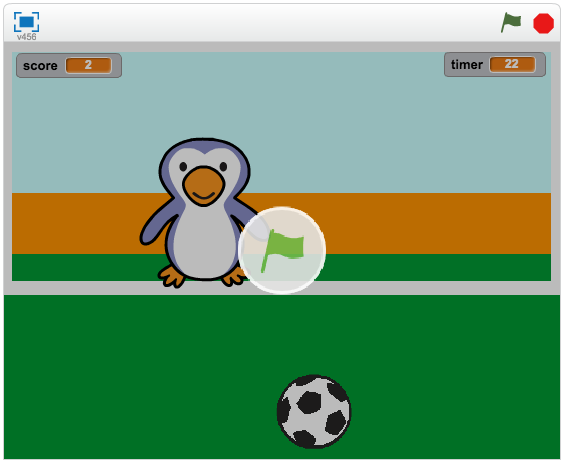
Each student had access to an imac. By working individually rather than in groups I could clearly see who could manage with this task independently and who struggled. Instructions and hints to possible lines of code to be used was shared with the students, but most seemed to be able to go ahead and create the code (or at least experiment) without the instructions.
By the end of the session, two thirds of the class managed to get to the end of game within an hour. Zoe (from OMGTech) challenged them further to create a two player game. Instead of random movement of the goalie (or a stationary one), code was needed to control the goalie instead using the arrow keys. Just over half the class were able to achieve this independently.
This was a really good task to test the skills of the students. It is not a task that I would start with early in the year with students who are new to coding. This task tested the skills that had been learnt over the last two terms. It was reassuring to see that most of the students had the skills to achieve level 4 of the new digital curriculum.
Friday, 14 April 2017
Coding - Scratch Games shared at Te Oro
Our Manaiakalani group of schools in Auckland, NZ have been learning about how we can take care of our local environment. The theme was 'Te Taiao o Tamaki'. On Wednesday 12th of April our Manaiakalani Cluster of Schools held an exhibition at Te Oro to celebrate a term of learning about the environment. You can view highlights from the exhibition on this link.
At Pt England school our theme for the year is 'Responsiblity'. In term one we have focused on 'Kaitiakitangi i nga wa katoa' which is about taking care of our environment and everything in it. The Year 7 & 8 Extension group used Scratch to create games about our local environment.
This is the first time that many of our students have used Scratch. This was a great platform to learn how to code using blocks (lines of code) rather than text. The backgrounds are of our school, local reserve and beach. The exhibition at Te Oro was an opportunity for our Year 7 & 8 Extension students to share their learning this term. The 'Game Space' area was very popular with students at the exhibition.
Link to the students games

Scratch Games at Te Oro - Manaiakalani Cluster Exhibition 2017 from SchoolTV on Vimeo.
At Pt England school our theme for the year is 'Responsiblity'. In term one we have focused on 'Kaitiakitangi i nga wa katoa' which is about taking care of our environment and everything in it. The Year 7 & 8 Extension group used Scratch to create games about our local environment.
This is the first time that many of our students have used Scratch. This was a great platform to learn how to code using blocks (lines of code) rather than text. The backgrounds are of our school, local reserve and beach. The exhibition at Te Oro was an opportunity for our Year 7 & 8 Extension students to share their learning this term. The 'Game Space' area was very popular with students at the exhibition.
Link to the students games

Scratch Games at Te Oro - Manaiakalani Cluster Exhibition 2017 from SchoolTV on Vimeo.
Monday, 3 April 2017
Inquiry Focus 2017 - Term 1 Findings
Today during our staff meeting we broke off into our collaborative groups to share our findings so far for our inquiry focus. This is a summary of my inquiry findings this term.
Year 5 & 6 Extension: Focus on deep dialogic discussions (Paideia method)
Year 7 & 8 Extension: Focus on coding using Scratch
Wednesday, 22 March 2017
Coding and OMGTech
The Year 7 & 8 Extension students were lucky enough to receive support in the form of Zoe and Alex from OMGTech to help with their projects on Scratch. Their knowledge and support was invaluable and helped the students to make headway with their projects. First they introduced themselves, described their backgrounds and then explained the basics of using Scratch. Later they worked with the students and helped them to problem solve and deal with issues regarding their games.
OMGTech visit Part 1 from SchoolTV on Vimeo.
OMGTech visit Part 1 from SchoolTV on Vimeo.
Wednesday, 15 February 2017
Year 7 & 8 Coding Survey
Since the focus this year will be about learning how to use code to improve the students critical thinking skills, they were giving a survey to complete which was about coding. Although there are 18 students in the group, there were only 14 responses as some students were away. Here were some of the results from the survey.


- For the question: What is coding? - Most of the students responded by ticking the box that said coding is about writing a set of instructions for a computer to follow.
- 100% of the students agreed that students should be taught how to code.
- Most had used coding programmes such as code.org, code combat and Scratch before. Not many had used Khan Academy or other sites.
- I'm not sure if the students understand what the types of coding languages there are e.g. html, Javascript, Python etc.
- Most were unsure if they had the skills to teach others how to code.
- Most have used a coding programme for 2 years or less.
- Most agreed that code.org was a good coding programme to use for students because it is a good site for beginners.
- Most agreed that learning how to code would help to improve their thinking skills.


Friday, 7 October 2016
ULearn 2016 Day 3
Enhancing Thought-Full Classroom Dialogue - Karen Boyes


Turning fear into fun - students who laugh more learn more! Its ok not to know or to fail
Listening sequence: Pause, paraphrase, Probe (inquire and clarify).
How to hang on to an idea - repeat a key word or idea in head, connect with what is being said to a similar experience, visualise what is being said. In a noisy environment - need to lean in more, focus on face, maybe lip read. Speaker can slow down speech.
When you really listen there are values e.g. respect, curiosity, etc
Teaching oral language is extremely important. When teachers use great language in context, children will learn it. Use language of thinking e.g. compare, predict, analyse.
Metacognition: Think aloud problem solving (TAPS). Strategy is important for students for efficiency of answers - but it's not a reflection of intelligence.
I enjoyed this workshop as the presentation was engaging, interesting and I walked away with some useful strategies to try out.
Building thinking and mathematic capabilities through coding in the primary school
Leamington School
General skills being developed when engaging in coding activities.
Coding presented an authentic learning opportunity to learn about positional language, instructions and shape (geometry)
Apps: Scratch Jr, Daisy the Dinosaur, Pyonkee (All three available on ipads)


Lightbot used to cover basic introductory elements of coding.
Core school values and SAMR model underpinned focus on coding strategy pathway. Juniors spent time outside focusing on positional language and direction before looking at coding language.
App called Tickle used to control robots. Use knowledge of Pyonkee to code robots to make shapes. Used Ollie/Sphero. Activities involved problem solving, thinking and communicating.
Daisy the Dinosaur and Scratch Jr - used by Junior school children. Over time, completed basic challenges with a partner. Used whiteboards to model drawing the shape/letter. Success Criteria used. Taught how to provide effective peer feedback.
Discovered that there was a huge shift in knowledge after children experienced coding activities.
App was created to record children using ipad. Then they analysed thinking skills data. Studio code programme.
Learning to code was the vehicle, but they were interested in evaluating which thinking skills were being developed. Weighting against higher order thinking was significant. Coding activity was an excellent environment for teaching and allowing children to think. Great to work in pairs or in threes (for communication, reinforcing skills and knowledge, and thinking)
Next step - Robotics, Java scripting etc
Great workshop with some interesting ideas of how to use it in the classroom and evidence to back it up.
Karen Spencer - Final Keynote Speaker
'Beyond the echo chamber: The extraordinary possibilities of a networked profession'

Praxis makes perfect - weaving and intertwining of ideas.
Methods that we adopt for our craft is important for teaching. Professional learning today is driven by teachers.
'A Key Note' - is the one that sets the tone for a song
Teachers make the biggest difference
Conversations with our students are important to check that if we are adding value to their understanding and learning.
Hold the line - trial something first to see if your student or community needs it. Before trialling anything do 3 things: find the most urgent area that students need most, see the story behind the data, embrace discomfort. 'Hold our ideas lightly'.
Teachers are constantly designing solutions to educational problems.
NZ curriculum document is great starting point to identify areas of need.
A future focused vision: inclusion of disabled
Pause before you leap into the next innovation - look for the need.
Maori students voices - gathered on the marae though safety net of tikanga and protocol.
Treat student voices like art.
We only see things through our own biases. Teachers have different perceptions, perspectives and experiences. We need to embrace discomfort. Teachers make a lot of assumptions about what constitutes good teaching. We can't assume what people need.
How to include diverse views in school. Role is to keep the fear off the set (John Cusack Rule). Celebrate diversity. We need to acknowledge differences.
What is research likely to say? Look for evidence/proof that new idea is working before trialling something new.
For children they feel both the fear of failure and success.
Tri-Une Brain

Turning fear into fun - students who laugh more learn more! Its ok not to know or to fail
Frontal lobe is part of brain we are trying to influence.
Higher order thinking to emotional to lower order
If children are hungry they can not learn - can’t do higher order thinking if they are under stress
Turning fear into fun - students who laugh more learn more! I
When asking kids questions don’t just stop at the right answer, keep encouraging them to answer.
Say thank you and encourage participation.
Be non-judgemental and build a safe classroom environment so that they give their ideas
Manage impulsivity - encourage students to take time to think
Give students enough time to think - at least 7 to 10 seconds (pause time)
Think, pair, share - helps to clarify ideas
Need to teach children how to listen.
Listening and understanding with empathy.Listening sequence: Pause, paraphrase, Probe (inquire and clarify).
How to hang on to an idea - repeat a key word or idea in head, connect with what is being said to a similar experience, visualise what is being said. In a noisy environment - need to lean in more, focus on face, maybe lip read. Speaker can slow down speech.
When you really listen there are values e.g. respect, curiosity, etc
Teaching oral language is extremely important. When teachers use great language in context, children will learn it. Use language of thinking e.g. compare, predict, analyse.
Metacognition: Think aloud problem solving (TAPS). Strategy is important for students for efficiency of answers - but it's not a reflection of intelligence.
I enjoyed this workshop as the presentation was engaging, interesting and I walked away with some useful strategies to try out.
Building thinking and mathematic capabilities through coding in the primary school
Leamington School
General skills being developed when engaging in coding activities.
Coding presented an authentic learning opportunity to learn about positional language, instructions and shape (geometry)
Apps: Scratch Jr, Daisy the Dinosaur, Pyonkee (All three available on ipads)


Lightbot used to cover basic introductory elements of coding.
Core school values and SAMR model underpinned focus on coding strategy pathway. Juniors spent time outside focusing on positional language and direction before looking at coding language.
App called Tickle used to control robots. Use knowledge of Pyonkee to code robots to make shapes. Used Ollie/Sphero. Activities involved problem solving, thinking and communicating.
Daisy the Dinosaur and Scratch Jr - used by Junior school children. Over time, completed basic challenges with a partner. Used whiteboards to model drawing the shape/letter. Success Criteria used. Taught how to provide effective peer feedback.
Discovered that there was a huge shift in knowledge after children experienced coding activities.
App was created to record children using ipad. Then they analysed thinking skills data. Studio code programme.
Learning to code was the vehicle, but they were interested in evaluating which thinking skills were being developed. Weighting against higher order thinking was significant. Coding activity was an excellent environment for teaching and allowing children to think. Great to work in pairs or in threes (for communication, reinforcing skills and knowledge, and thinking)
Next step - Robotics, Java scripting etc
Great workshop with some interesting ideas of how to use it in the classroom and evidence to back it up.
Karen Spencer - Final Keynote Speaker
'Beyond the echo chamber: The extraordinary possibilities of a networked profession'

Praxis makes perfect - weaving and intertwining of ideas.
Methods that we adopt for our craft is important for teaching. Professional learning today is driven by teachers.
'A Key Note' - is the one that sets the tone for a song
Teachers make the biggest difference
Conversations with our students are important to check that if we are adding value to their understanding and learning.
Hold the line - trial something first to see if your student or community needs it. Before trialling anything do 3 things: find the most urgent area that students need most, see the story behind the data, embrace discomfort. 'Hold our ideas lightly'.
Teachers are constantly designing solutions to educational problems.
NZ curriculum document is great starting point to identify areas of need.
A future focused vision: inclusion of disabled
Pause before you leap into the next innovation - look for the need.
Maori students voices - gathered on the marae though safety net of tikanga and protocol.
Treat student voices like art.
We only see things through our own biases. Teachers have different perceptions, perspectives and experiences. We need to embrace discomfort. Teachers make a lot of assumptions about what constitutes good teaching. We can't assume what people need.
How to include diverse views in school. Role is to keep the fear off the set (John Cusack Rule). Celebrate diversity. We need to acknowledge differences.
What is research likely to say? Look for evidence/proof that new idea is working before trialling something new.
ULearn 2016 Day 2
Prof Michael Fullan - Keynote Speaker
New Pedagogies for Deep Learning

System transformation
They build knowledge and practices that foster deep learning and whole system change
Humans are innately wired to connect, create and help humanity
Children are highly creative, but school cuts some of this creativity.
Millennials tend to gravitate towards organisations who do good things
New learning partnership between students, teachers and parents
6Cs - creativity, critical thinking, communication, collaborating, character, citizenship
Deep learning and equity - students that were underserved benefitted the most
Whole system change strategies:
- Accountability
- Standards
- System culture
Breakthrough leadership:
- Respect and reject the status quo
- Be an expert and an apprentice
The 7th sense
- Social media is ubiquitous
- Weakens hierarchies
- Distribution and concentrated connection is the new power
- The young are the most connected and the least committed to the status quo
- Humans, especially the young, find ‘helping humanity’ to be an extrinsic value
The job of education is to produce better citizens for tomorrow, today
Pedagogy is the driver, technology is the accelerator
Big Idea:
Students as change agents
Professional capital of teachers
Coherence
Deep learning unleashes bottom up learning
Hon Hekia Parata
Minister of Education

It can only be the profession that leads the profession. Not interested in targets and asserts that she is interested in kids learning and having choices for the future. Wants every child to get the best education possible. How will funding closely align with what the size of the educational challenge is? Strong sense of urgency that our students are successful, confident, connected global citizens.
NZ has an amazing educational system but we don't make use of full functionality that it provides. PLD - a lot of money has been spent, but not enough evidence of success. What are professionals (teachers etc) in our community of learning going to do? Building better learning environments? Build better pathways for students?
Learning how to Code - Apple workshop

Everyone should have the opportunity to create something that can change the world.
Swift Icon. My Playground - Learn to Code 1. We had the opportunity to play with this simple coding programme.
Video showing ordinary people solving real problems with code. Understanding coding concepts is a new literacy. Creativity is important and code allows development of this as well as skills like problem solving, critical thinking, collaboration.
Swift enables the ability for people to practice code. Developed by Apple and the community. It's easy to use, interactive, powerful, and open - source. Playgrounds allow code to be written and tested as its being written.
Swift Playgrounds and App Development with Swift. It introduces young learners to coding principles. Used on ipads, coding lessons built in, real coding in Swift, built for touch. Glossary of terms available. Ability to take photo/recording of code to record/capture evidence of learning. Special keyboard feature available to use.
Branch Out lesson - for loop in coding (In computer science a for-loop (or simply for loop) is a control flow statement for specifying iteration, which allows code to be executed repeatedly.) Can zoom in and out of worlds. A skill is to be able to write code effectively that can be used over and over again.
ibook app - resources can be downloaded - content for teachers, how to teach coding.
Learning to Code 1 & 2 - suitable for ages 10 -15
App Development for Swift - suitable for secondary students
OMGTech! Rangers Workshop — an introduction to robotics, coding, and 3D printing

3 different areas in the room were organised to cater for hands on practice on robotics, coding and 3D printing. Really cool! We were able to rotate around 4 different stations for 20mins each.
Robotics: We had to create code which would direct a small robotic car/tank? to navigate its way around a track on the floor.
Coding: We had the chance to create a very simple game using a programme called Scratch.
3D Printing: Basically we were given a presentation about 3D printing and how the design process was more important at this stage then using the actual 3D printer as its time consuming to print and printers tend to have technical issues.
There was also another activity set up where we could take apart an old CD player to look at all the different parts inside it. Interesting to find out that the physical structure of modern hard drives are similar to old record players e.g. disc with something that is able to read the information off the disc. Difference is that modern discs hold much more info.
Subscribe to:
Posts (Atom)